
Duplicating a page or post in WordPress should do more than copy and paste. The right approach also carries over your templates, featured image, and SEO metadata, so you can redesign, localise content for New Zealand audiences, or spin up variations without starting from scratch. Below are two proven methods: a plugin route using Yoast Duplicate Post and a manual functions.php snippet. Both preserve key data and are safe when used correctly.
Option 1: Duplicate with Yoast Duplicate Post (plugin by Yoast)
Why this method?
- Lives in your dashboard (no code edits)
- Copies content, excerpt, featured image, Yoast SEO fields, and more
- Supports Clone, New Draft, and Bulk duplication
- Lets you choose which post types can be duplicated
Steps
- In Plugins → Add New, search “Yoast Duplicate Post.”
- Install and Activate.
- Go to Settings → Duplicate Post to configure:
- Permissions: Select which post types (Pages, Posts, CPTs) can be duplicated.
- Behaviours: Choose whether to copy title, slug, status, excerpt, featured image, and more.
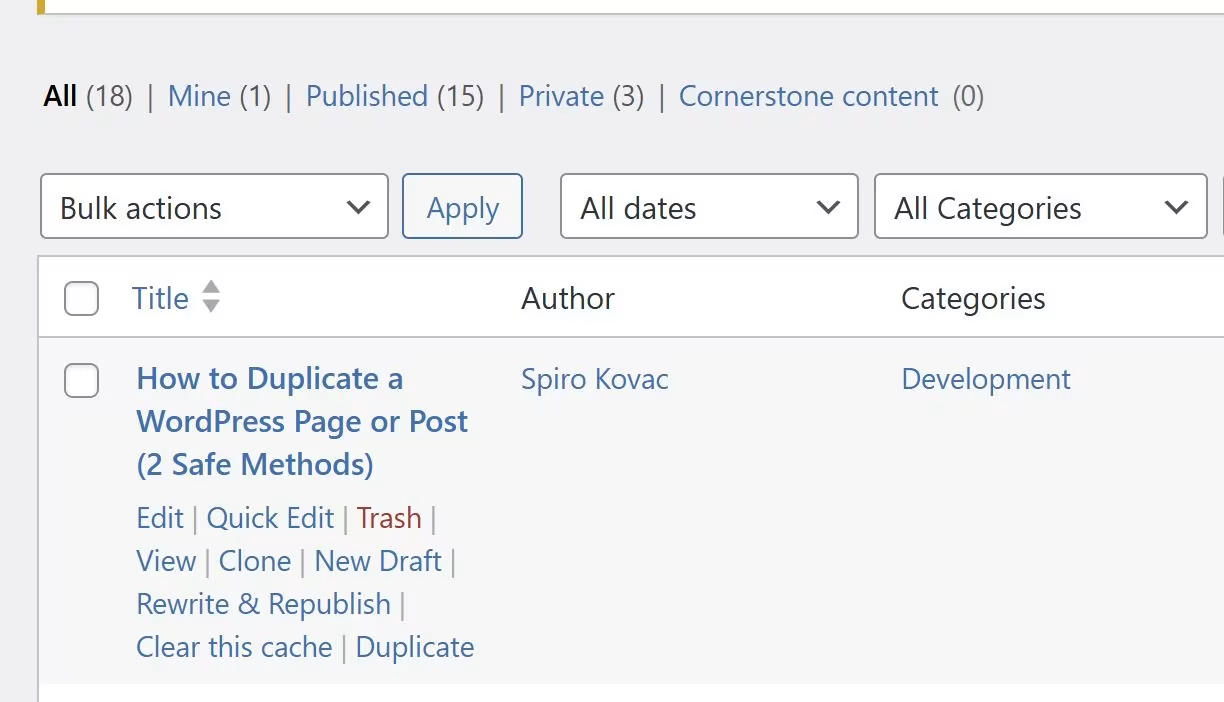
- To duplicate, go to Posts → All or Pages → All, hover an item, then click Clone (creates a copy) or New Draft (opens the copy for editing).
- To duplicate many at once, tick multiple items and use Bulk actions → Clone.
Option 2: Duplicate with manual functions.php code (no plugin)
When to use this method
You need to ensure post meta (including Yoast SEO fields) is copied. You prefer minimal plugins. You want an always‑available “Duplicate” action for Posts/Pages.
Add this exact code to your (child) theme’s functions.php:
// Add "Duplicate" link to post/page row actions
function rd_duplicate_post_link( $actions, $post ) {
    if ( current_user_can('edit_posts') ) {
        $actions['duplicate'] = '<a href="' . wp_nonce_url(
            'admin.php?action=rd_duplicate_post_as_draft&post=' . $post->ID,
            basename(__FILE__),
            'duplicate_nonce'
        ) . '" title="Duplicate this item" rel="permalink">Duplicate</a>';
    }
    return $actions;
}
add_filter( 'page_row_actions', 'rd_duplicate_post_link', 10, 2 );
add_filter( 'post_row_actions', 'rd_duplicate_post_link', 10, 2 );

// Handle duplication logic
function rd_duplicate_post_as_draft() {
    global $wpdb;

    if ( ! ( isset($_GET['post']) || isset($_POST['post']) || ( isset($_REQUEST['action']) && 'rd_duplicate_post_as_draft' == $_REQUEST['action'] ) ) ) {
        wp_die('No post to duplicate has been supplied!');
    }

    // Get the original post ID
    $post_id = (isset($_GET['post']) ? intval($_GET['post']) : intval($_POST['post']));
    $post = get_post( $post_id );

    if ( isset( $post ) && $post != null ) {
        // Create new post data array
        $new_post = array(
            'post_title'    => $post->post_title . ' (Copy)',
            'post_content'  => $post->post_content,
            'post_status'   => 'draft',
            'post_author'   => get_current_user_id(),
            'post_type'     => $post->post_type
        );

        // Insert the post into the database
        $new_post_id = wp_insert_post( $new_post );

        // Copy post metadata
        $post_meta = get_post_meta( $post_id );
        foreach ( $post_meta as $meta_key => $meta_values ) {
            foreach ( $meta_values as $meta_value ) {
                add_post_meta( $new_post_id, $meta_key, maybe_unserialize( $meta_value ) );
            }
        }

        // Redirect to edit screen for the new draft
        wp_redirect( admin_url( 'post.php?action=edit&post=' . $new_post_id ) );
        exit;
    } else {
        wp_die('Post creation failed, could not find original post.');
    }
}
add_action( 'admin_action_rd_duplicate_post_as_draft', 'rd_duplicate_post_as_draft' );
Best practices after duplicating to avoid SEO pitfalls
Cloning content is just the first step protect your rankings by giving each copy unique titles, slugs, and meta descriptions, refreshing the text for a distinct search intent, fixing canonicals, and updating internal links and schema. If you would like an expert to audit and optimise your duplicates for New Zealand search, our SEO services cover technical fixes, on‑page tuning, and content expansion to turn copies into high‑performing pages.
Change the H1, SEO title, and meta description for unique intent.
Edit the slug (e.g., add “-nz” for a New Zealand variant).
Check internal links and canonical settings if you keep both versions indexed.
Keep template copies as drafts or noindex to prevent thin/duplicate content.
Refresh image ALT text and captions on the new page.
FAQs
Does Yoast Duplicate Post copy SEO metadata?
Yes. Yoast SEO fields are stored as post meta, which the plugin and the code method preserve.
Will duplicating harm my rankings?
No, provided the new page is meaningfully different. If it’s just a template, keep it as a draft or noindex.
Can I bulk duplicate items?
Yes with Yoast Duplicate Post (Bulk actions → Clone). The manual code above adds a single‑item Duplicate link only.
Does the manual code copy featured images?
Yes. The featured image is stored in post meta (_thumbnail_id), which is copied.
Will categories and tags be copied with the code method?
Not by default. Assign them on the new draft. (Yoast Duplicate Post can copy taxonomies if enabled in settings.)
Is it safe to edit functions.php?
Yes, if you use a child theme, make a backup, and test first.